

Happy Friday, everyone.
First things first, the editorial meeting for Maggie 2 went great. We are given green light, but we do have a ton of work to do before September 1st.
They are not asking us to cut for length. ::pauses:: They actually ask for more stuff. This book will be the size of the Subterranean Innkeeper edition.
We will be starting tomorrow with a short story that will kind of lay some foundation, and then we will be moving straight into the edit. But that’s tomorrow.
Today I have a cup of the delicious Sencha tea, and I have time for a short personal post.
Have you noticed how the things that make you happy change in adulthood? When you are an adolescent, a cool outfit can make you ecstatic. But when you move to adulthood, you get excited by things that make your life easier. Sometimes they just have to work and that alone is enough for a dopamine hit.
When we started filling the vellum orders, I asked Gordon to bring the printer from the office into the house. If you are new to our blog, we have a separate building on the property, which has a garage and our office room on the first floor and a tiny apartment above it. The apartment was a huge plus for us, because at the time we bought the house, our kids were old enough for their own space but not quite ready to move out completely.
Anyway, Gordon went to get the printer. It is HP Color Laserjet Pro MFP m283fdw, which is huge, and it weighs about 45lbs. I made the mistake of offering to help and was given the official Man Look of No.
The massive printer was installed in the study on a side table sturdy enough to support it.
Me: plug USB cord into the giant printer. Plug USB cord into PC. Turn printer on. Access Printers on Windows. Click find printer.
Windows: Nope, not there.
Me: plug into different USB slot.
Windows: Still no.
Me: Turn printer off. Turn printer on.
Windows: Naaaah.
Me: Turn everything off. Reboot PC. Reboot printer.
Windows: What is printer? Does anyone know?
Gordon: Have you tried doing it over wireless?
Me: I have and it constantly loses the connection. It has a damn cable. There is a literal cable connecting to to PC. I don’t understand.
Me: Download HP utility app.
HP app: No printer found!
Me, to Gordon: I swear, this is about to turn into a sequel to Office Space. I’m going to drive to Best Buy and buy a f*cking new printer.
Gordon: I will get the keys.
Me: Give me like ten more minutes.
Me: Reboot everything one more time.
Windows: Oh wait, there it is.
Anyway, after about an hour of screwing with all of this, I was able to print the first batch of labels.
Because we are filling orders in batches, the massive printer had to stay in that spot by my desk. It is seriously messing with my ability to relax. I like to have a neat work space, and the less stuff around me, the better. The study is where we spend majority of our time and now there is a giant printer in the middle of things. To make things extra difficult, Tuna became horribly upset because his raised bed has been moved away from my desk to make space for said printer.
After a week of printing labels, the printer stopped.
Printer: You are out of ink!
Me: Okay, fine. How much is an ink cartridge for this thing… $285? Is it gold? Will it clean my house and make me lunch?
I order the new cartridge, and while I’m waiting on it, I see a video on Instagram. It’s a video of a tiny pink printer and that printer is printing labels. And the caption says, “No ink required.”
What is this sorcery?
I google the tiny pink printer, I watch more videos, and I show it to Gordon.
Gordon: Buy it.
I bought it and 24 hours later, I unpacked it.
Here it is, with Gordon’s iPhone for scale on the corner of my desk.
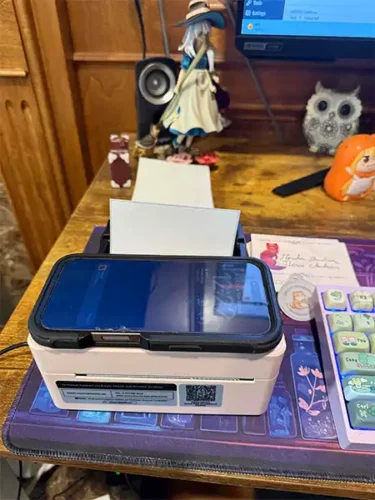
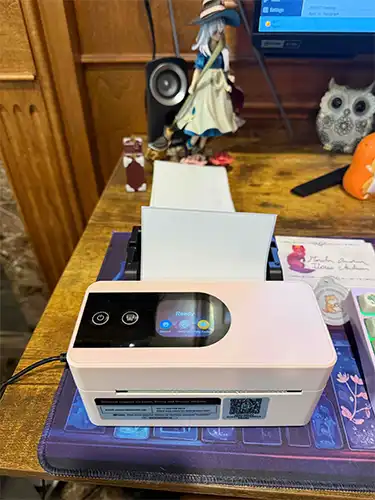
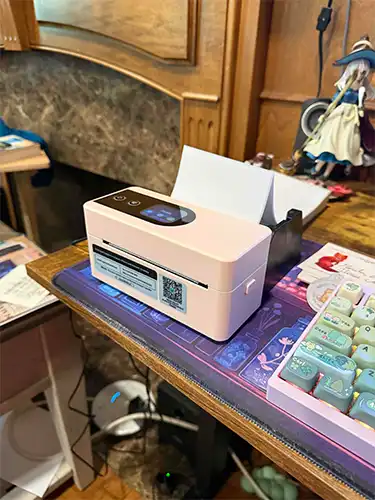
This is how small it is. This is how fast it prints.
It requires no ink. It prints on special thermal paper. And it connects via Bluetooth.
1,600 regular labels cost me $73. 1,000 thermal labels cost me $24.69.
Look, it prints cheap stickers.
Okay, so the stickers are not of amazing BDH quality, but if I wanted to slap them on the back of an envelope or something, they work. Basically, it prints any black image onto a variety of thermal paper.
Gordon took the massive printer back to the office.
I am so happy. So happy. I know it’s a small thing, but I feel like I have my desk back. And most importantly, Tuna can resume his vigil, hehe. It probably makes me a dinosaur, but I had no idea thermal printers existed.
If you want your own tiny printer, this is Phomemo PM64D. You can find it on Amazon. It’s not an affiliate link.
Now the next challenge will be buying a printer that can actually print small scale sticker batches of good quality. I’m eyeing Epson Ecotank 8550 and a cutter.
Well, I am going to go print more labels. I will see you on Saturday or next week. I had fallen off the wagon and bought yarn, so there will be pretty pictures.


Printers can be such a pain! Words and more Maggie words! Yay!
Join the yarn horde you can never have enough.
True!
oh, the printers of the world!
they will start the apocalypse,
printer: I have no magenta,
me: doesn’t matter, I need black and white
printer: I, HAVE, NO, MAGENTA!
me: ahhhhhhhhhhhhh
and things like that.
yarn?
I love yarn.
I’m super, super proud because I’m making a poncho for a friend and I created the pattern from zero, everything designed by me.
it was much counting, and Excell, and calculator, and drawing, but it is sooo cute and worth the effort.
I can’t wait to see her face when she gets it.
if someone wants it I can show photos and share how I made it.
So much this! even with the printer switched to black and white mode. Then work did a new update and I have to reset my home office printer so it talks to the work laptop again. sometimes I just email it to my personal email and print from my home computer. And the husband’s lap top stopped talking to the router while it was in the workshop. Had to get a router extender. technology strikes again.
It took me several minutes to realize that is a phone and not the top of a larger printer. It is so awesome.
I become overjoyed when I figure out how to get things to work.
I have to have one of those stickers
PLEEEEEAAAAAASE
I love that coloring of the stickers.
I’m so happy you are happy.
On a side note- I think you worry too much about the BDH. If you want to write to us the do so. Please don’t feel obligated. We want you happy and writing and happy.
“This book will be the size of the Subterranean Innkeeper edition”
Thank you for the food…I mean the book.
+1000
Now I want a reason to print labels and buy that printer
Thermal is back?? We had a thermal copier and a thermal fax machine … oh, 40 years ago. Now I’m feeling old.
I thought the same exact thing. I remember that faxes, telex, and receipts were thermal. And that the image would fade away over time. You would look for something only to find a blank page/receipt. Goodness, I too am feeling old!
I remember having to photo copy any faxes or receipts because I was required to keep records for seven years. I questioned at the time how this was “saving paper”.
I got a new router a month ago. “Will enable faster speeds!!!” Notsomuch, but that’s not what this is about. I had to spend 2 hours, with walking away time to take my foot out of reach of the printer, before the computer could find the [expletive deleted] printer. I was THIS short of re-downloading the driver.
I am JUST good enough with my computer to get myself in trouble, and sometimes I go in circles enough that when something does work, I have no idea what I did, so I can replicate it ‘next time’. Sigh.
^ This!
When the shop reopens, will we be able to order the vellum pack? New to the site, and just finished book 1, would love to have those overlays!
Congratulations on finding a printer that works. I am convinced the good Lord invented printers to test my conviction not to cuss.
Remember when you first decided to become an author and thought all you would need to do is write and someone far, far away would do everything else?
Yeah I’m done with Microslop, switching to Linux.
glad you were able to make it find the printer. Back rereading white hot…
ZenHugs
every time I need to print my son’s school stuff this happens SO annoying.
Love your books! Finish Maggie 2 as soon as you can.
My 16 pound cat sat on my printer. The printer did NOT like this. 2 hours, many bad words, and much open, close, no not close, slam shut, jigger, re-jigger, more cussing..it will now print..mostly. I feel your pain!
Ohhh, pretty printer. I have a smaller portable thermal printer and I like it so much better than my big lug HP printer. Congratulations on your new addition and on the successful edit! I’m looking forward to Maggie2. I hope you all have a relaxing weekend and enjoy your yarn.
I refuse to speak bad of my wireless printer for fear of it hearing me. I am constantly telling it, “you are a great and wonderful printer and I love you.” It’s happy, I’m happy. I say no more. Not even what a great printer Ilona now has. (I whisper typed that so it would not hear. LOL
Printers and I have a hate hate relationship always! What a great find!!! And happy for Tuna too 🫶🏻🫶🏻
hey, there. i completely relate to this post. i have 5 printers. i use 3 on a regular basis. i have an hp laser printer i have yet to set up & use. i have a canon that can print on larger paper. i use it to print out 12×12 papers for crafting. i use that intermittently. i have an hp that i print mostly documents or b&w pages. and my favorite printer is the epson et-8550. i bought 2. one for regular printing which i use constantly & one for sublimation printing which im still learning about. i just wanted to put my 2 cents in. i print hundreds of papers in a month & the full inkwells last me about 6 months or so. i seem to run out of grey first, magenta 2nd, so the other colors tend to last longer than 6 months. if this printer had a 12×12 paper setting, id get rid of my canon altogether, but its not a setting it has. which is weird because you can print up to 13×19 papers. its easy to work. it has good remote range & while i do get glitches, its less likely than my other printers. i would definitely recommend the et-8550. it has good quality prints & you save so much money on ink, if you use it a lot, it will pay for itself in a year or 2. cartridges are such a drain on your wallet if you print a lot. the worst thing about it is that with some of the papers i use, i have to feed it from the back, which you wouldnt think is a big deal, but it is. its because you have to remove parts of the back & convert it to the back feeder. i dont understand why i cant just use the rear feeder in leu of the back feeder, but they made it difficult. you have to rotate the unit so you can get all the way in the back- its not something you can do blind or from the front. there are tutorials on you tube so you can see what im talking about. i only get told by the printer to use it for 110 lb or heavier cardstock & a few sizes of picture papers. i have mine on a rotating platform like a lazy susan- like what you put a tv on in an armoire. oh, and ive heard that the back feeder can leave tracks on thicker paper, but not ink tracks- just indentations of where the rollers fed it through. i got mine for $700 3 years ago on black friday from amazon, at least im pretty sure thats correct. anyway i hope your printing woes get better.
oh & i can get ink for the et-8550 for about $20-$25 for all 6 colors.not epson, but even epson ink is cheap compared to the ridiculously priced cartridges. maybe $75 or thereabouts for the epson brand pack of 6. and the bottles of ink are big enough for filling the inkwells all the way up once & then maybe another ½ way up before its out. its a *lot* of ink in each bottle.
i just looked & its only $600 on amazon right now. comes with 6 full sized bottles of ink. black friday isnt too far off, maybe it will come down even more. idk. i mightve paid $600 for it. its been awhile, so i cant be sure.
It’s the little things in life sometimes! That is also the most adorable little printer I’ve ever seen, and so functional to boot. Nice find!
A word of warning about the thermal printers, they have stability/fading problems associated with time and heat. Sorry to bring a downer point, but ooh. More words and beautiful yarn! Yay!
Yes, this!
I work in a lab where certain equipment prints onto thermal paper. We are required to immediately make copies of the printouts because the printouts do completely fade out in a (relatively) short time.
what is the Subterranean Innkeeper edition?
A past special edition omnibus of The Innkeeper Chronicles by Subterranean Press. Long sold-out and in much demand. https://ilona-andrews.com/blog/vellum-updates-and-a-bribe-giveaway/
Our HP printer gave us the out of ink message for 7 months before it was really out of ink. Thanks for the info on an alternative!
That new label printer is amazing! I loved watching it print those labels. I am so happy for you that you found a reasonably priced printer that works! I knew about thermal labels, only because I do a lot of personal correspondence so got myself a Dymo LabelWriter 450 Twin Turbo. This prints both small return labels and larger mailing labels. I love mine so I know you will love this one. And congrats to Tuna for getting “his” spot back!
That is amazing! It’s so fast and NO ink?!?!? After ditching the last $^$#^$# *(^@ printer, we too got a massive HP – likely a cousin to yours the MFP M281CDW. The more urgently you need to print something the less likely it is to work. It randomly goes offline for extended periods and pops back up while you are hunting down the old baseball bat. Sometimes a combination of turning it on and off, swearing at it and unplugging it and plugging it back in 17 times will make it decide to print something. AAAGH! So excited about the next Maggie – I’ve recommended the first one to several people already and can’t wait for the next one!
I think I recall you did a blog about your keyboard. Seeing just a peek of it in your printer pix, twigged my memory. Any chance we could revisit that. It’s so cute! Thanks for considering my request ❤️
Hey Julia, here is that post 🙂 https://ilona-andrews.com/blog/the-coziest-keyboard-ever/
Thank you, Mod R!
“…the official Man Look of No” ROTFL, I get that a lot now. He got my cardiologist to forbid me to lift boxes and things. Dave has his eagle eye on me anytime I look like I’m thinking about picking something up.
Bigger Maggie? I’m delighted.
The printer is adorable.
Big Printer can’t go down fast enough. Took over an hour to get mine working (by a Silicon valley VP) and the next week when I went to print— NADA.
If the BDH can do their part to fix the printer situation it will make my decade.
HP is famous for screwing people over on very expensive ink (and service contracts, where possible). You get a slightly cheaper printer in exchange for one where the ink is expensive, and the company making it is always looking for more ways to extract more money from you. Going with another company is going to be the best in the long run.
First – I NEED THAT PRINTER!
Second – I have an HP Model …fdw just like yours. It SUCKS. I’ve had it 9 years and in those 9 years, it has never worked correctly. The feeder won’t pull more than 1 sheet of paper through and then it stops. It looses connection and Apple can’t find it. The other day, all my devices lost connection. AirPrint said there were no AirPrint devices. I had just printed a recipe the day before using AirPrint. I turned if off, on, no luck. Check WiFi, that’s good, Off, on, no luck. TOTAL RESET. Now can’t find WiFi. Found WiFi. Print again. Hallelujah! it found it.
I have a new printer saved to my list in Amazon; it is NOT an HP. They used to be total workhorses – I had the same on in my office at work for almost 20 years (yep, you read that correctly). Now, they are pieces of crap. Epsons are really good. I have a Canon, it eats ink, but it’s an ink jet I rarely use except for specialty printing.
Yes! We love label printers, they always just work. I’d had a tiny purple phomemo for two years and its still the best thing I’ve ever bought for my small business and occasional book reselling 😂
I’m glad you found that cute label printer!
Awhile ago, I bought a cute, square Brother printer to print the kind of labels on tape that you put on spice jars, stuff in the pantry, etc. Loved it. Then Microsoft Windows updated and the printer driver is not compatible. No new driver available anywhere.
So I can either buy a new label printer, for about twice as much, or use my old manual hand-held thing (Brother from an much older mother, looks like an oversized calculator from the 1970s), on which you input words laboriously on a teeny keyboard and it spits out the label to be cut. That thing is a pain, but it works. I refuse to buy another Brother cube that will be outdated by the next Windows update. GAAAH!
Would it run with the old driver? Sometimes you can find earlier driver versions online. To keep it, you should look into the update settings of Windows Updates and deactivate the automated driver-updates. You can find how-to videos for this on YT, if you need help.
(Did it with my graphic card, used a video tutorial, works like a dream now.)
Epson Ecotank 8550
NO! I have had two. Neither lasted a year. Also, they must be re-introduced to the wifi every four hours. I made our wifi password as simple as possible because of it.
We now have a Brother MFC-J4345DW and the print quality is stunning. Plus, the thing is so quiet, I have to look to make certain it’s working.
I didn’t know they still made thermal printers. A house mate in 1984 had a digital typewriter with a one line display and thermal output on near-standard paper. It made the cutest chirping sound when the carriage returned. We were in the middle of the digital transformation and we saw some weird stuff.
I would like to warn you I had many issues with the ink drying and needing constant maintenance with the Epson Echotank.
NPR just had a review of Maggie 1! SQUEE! Somebody at NPR liked it too! I predict LOTS more sales in the future! YEAH & there was MUCH rejoycing!!
Yay!
OMG it’s so small! How can it be so frickin small? Thats adorable!
Printers hate humanity. Really. And they loose their compability for the official software in like 2-3 years, afaik.
I have a “small” old black and white laser printer from samsung, around 10 years old. It still works, but I have to start it twice so it will start printing right away. Any other (multifunctional) printer I had were fighting their software, their use and their very existence.
(80 € back then, best invested money for my tiny home office XD)
2 years ago my kodak printer had a fatal failure and I went looking for new a printer, but I searched filtering by replacement ink cost. All inkjets I found it was cheaper to get get a cheap printer from shoppers than to replace ink. THAT IS INSANE.
I spent an extra $200 Can and got an hp laser printer. 2.5 years later and 5000 plus sheets of paper printed my toner is still half full. I priced out a replacement toner today and it is $35 can.
why is anyone still using inkjet? My laser printer paid for its self in 6 months of no needeing replacement ink
Oem toner is also expensive and should be kept in fairly dry environments. Replacing oem toner cartridges in my home office size color laser printer would be (at least) a few hundred dollars. I don’t blame someone who looks at their use case and concludes they don’t want to pay that much for a few printouts and return labels.
Shoppers tend to overlook run and maintenance costs. Some HP lasers have DRM toner or subscriptions. Newer the consumer printer, the more likely it locks into an ecosystem and self updates firmware, thanks to the WiFi printing feature many people want and current revenue models (aka subscriptions and user data becoming the product).
Some of the less expensive thermal label hobby printers models also drm their labels.
I highly suggest, if you’ve not already, to watch the great British Channel 4 comedy, The IT Crowd. “Have you tried turning it on and off again?”….
How about, “where does this plug go?”. “Trying to check the weather, but the power is out. Can you fix it?”
I have not used HP products for about 15 years. The massive, buggy software that took up a lot of RAM and CPU resources and constantly needed updating was finally enough. I moved to Brother, a Japanese owned company that has good quality control so produces a good product. It stands on its quality instead of its marketing efforts. I have a large all-in-one machine because I need a document feeder and a scanner. No idea how it would work with things like stickers though.
When I’m with grandbabies if I ask them to pick up a sticker. If they don’t I pick it up put in my pocket. If they listen next time I put it in a special place for them to find. Otherwise- it’s mine💜🐾📚
Ooh it prints faster than I thought.
Although longevity on thermal paper is about 6 months to maybe 7 years (varying) before it fades to a level it’s not legible anymore. Exposure to heat can make it fade faster too. It’s helpful for shipping, but not for anything you plan to have longevity. I looked into them for art labels on my photographic art, and I was bummed by that fact, but I’m considering investing for just shipping labels.
and we know the most important things are that HA is happy about it, especially Tuna.
I had the opposite situation – new computer , old printer. Pretty much wasted a few hours trying to get them connected. The new computer kept insisting the printer had “errors”. I tried to print an 8 page document, got nothing, and (I kid you not) 2 days later!!! my husband is in my home office and the printer starts spitting out 8 pages.
I do recommend the tank printers instead of cartridge. The ink is MUCH cheaper.
My husband(ITguy) has that same effect on computers/printers/etc. The OG fix is to take a picture of him and tape it to the printer, facing inward so it thinks he is always there. Shrug, worth trying when all else fails.
Those do look very nifty. You offer keen wisdom regarding the ease of use and …
I will not click on the button. Buttons are evil. Don’t touch.
I can’t look. Last time I spent too much money and sent it all to family. So it wasn’t all bad but. Wow. So cute, little printer 🖨️🤓
Excited for Maggie but please, what’s the status on “The Inheritance” sequels? Will you release that as an appetizer before Maggie 2? One or two sequels? Wrapping up interdimensional war cannot be easy nor swift.
House Andrews have confirmed that The Inheritance will have at least one sequel, but it is not currently on the writing schedule. Maggie 2 comes first 🙂 .
Any further scheduling news will be announced on the blog and the Release Schedule page here https://ilona-andrews.com/release-schedule/ when there is something definite to share.
All right, keep your secrets from the Horde 🙂
Maggie 2 comes first like priority wise or the release of Maggie 2 will precede Breach Wars?
Hanging on to crumbs of hope
Wow that thing is fast! I can see why it gives u (and Tuna) joy.
I think the BDH has fallen in love w Tor. Which is not to imply that we have infiltrated Tor, nope, not at all. I’m sure this is how they treat ALL their authors. W*it… in between rereads, when looking for something new to read, we can look at other stuff Tor publishes. Hmmm.
Also, I wonder if the borderless vellums will fit in the trade editions?
Most receipt printers are thermal. Libraries, restaurants, fast food chains. This is why they fade after a while or left in a hot car. There are some printers using ink to make stickers. My library has a MakerSpace and they allow you to print up to three (3) sheets per week. They also have a sublimation printer. Cool technology for aspiring creatives.
Mmmm – there is definitely a place in this world for specialisation – whether it’s a person or the tool that does just that one task, and only that task, and does it supremely well. Now to convince employers that a capacity to specialise is useful… Although I sometimes think it’s been taken to an unhelpful extreme in the medical profession. But the funny thing is – I’d just been reading an interesting article in our New Zealand Consumer magazine about the way printer manufacturers are holding consumers to ransom through ‘authentic’ printer ink cartridges, and the article made mention towards the end of the Ecotank printer. I was considering posting a link to the Consumer website for the article in case it interested anyone – when lo and behold I get to the end of your post and there’s you have mentioned the Ecotank. I’ll be very interested in hearing more about this if you down that route, as the plastic waste from replacing cartridges upsets me and we’re unable to get them refilled where I live. If Mod R feels this post is inappropriate please accept my apology and remove it – I’m post surgery and taking codeine.
I’ll admit, after seeing the little video I bought the printer LOL! I had no idea such a thing existed. A nice compact little thermal printer that we can use for USPS labels! This is exactly what we needed. LOL!! It came like the next day (benefits of living super close to an Amazon warehouse) and it is AMAZING!!!! Thank you for the recommendation.